
How we compared the apps
We looked at the workflow a couple uses every week: inviting a partner, capturing a task quickly, assigning one owner, organizing different areas of life, completing tasks from two phones, and keeping plans visible without reminder texts. We also considered whether the app connects tasks to the rest of shared life.
Disclosure: Tandem publishes this guide and is included in the comparison. We describe where every option fits and link to official product documentation for features outside Tandem. Features and pricing can change; this comparison was reviewed in September 2026.
Quick comparison
| App | Best for | Assign tasks | iOS + Android | Beyond tasks |
|---|---|---|---|---|
| Tandem | Couples who want one shared home base | Yes | Yes | Calendar, expenses, Weekly Sync |
| Apple Reminders | Couples already inside Apple's ecosystem | Yes | No native Android app | Apple-focused task lists |
| Google Keep | Very simple shared checklists and notes | Collaborative list, no per-item couple workflow | Yes | Notes, images and drawings |
| Microsoft To Do | Couples who use Microsoft accounts | Yes, inside a shared list | Yes | Microsoft and Outlook ecosystem |
| Todoist | Advanced personal and project planning | Yes | Yes | Projects, views, filters and team workflows |
1. Tandem — best all-in-one organizer for couples
Tandem is the best fit when your task list is part of a larger shared life. It is built around one paired relationship rather than a workplace or a generic group. Both partners see shared tasks, can assign clear ownership, organize tasks into lists, set priorities, and complete items from either phone.
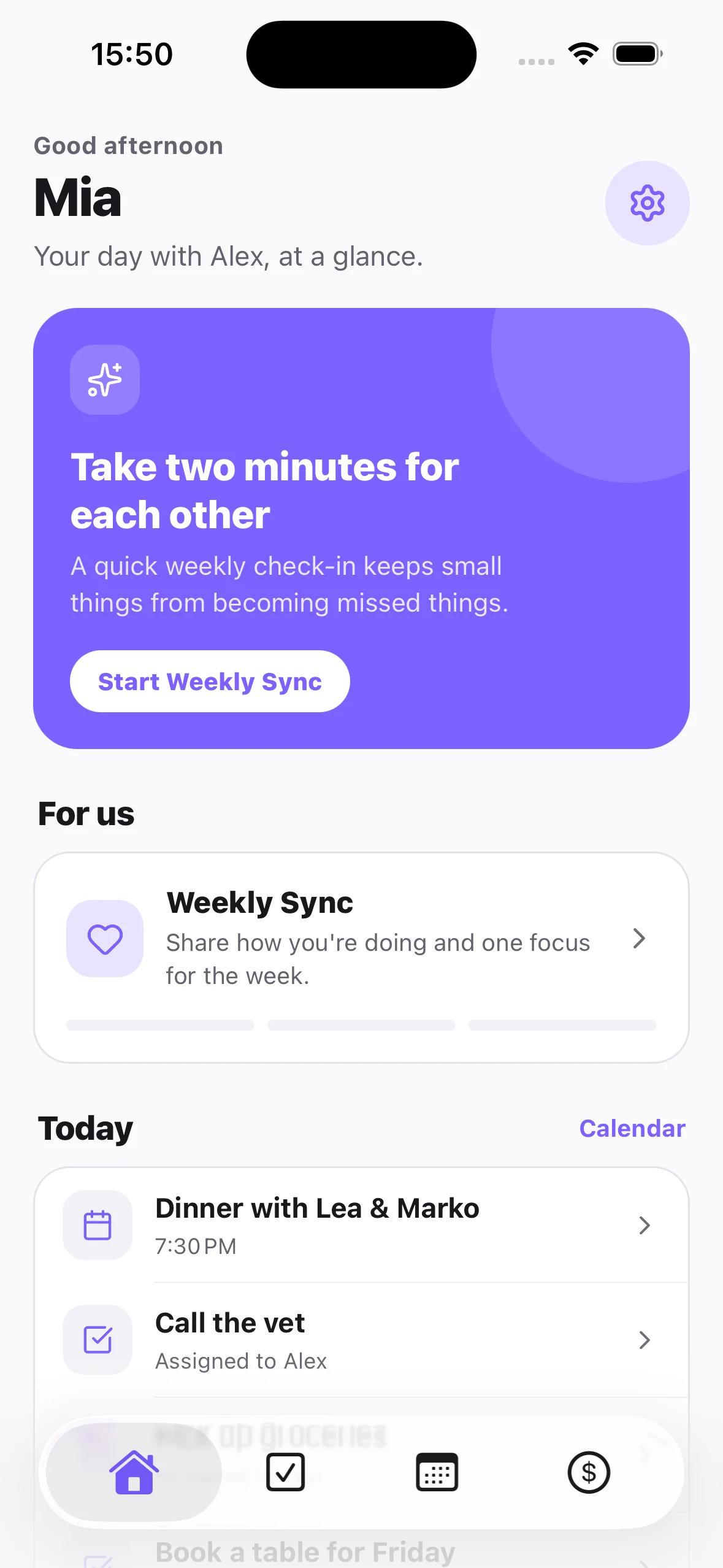
The main difference is context. A task like “Book a table for Friday” can sit beside Friday's calendar event, shared spending and the couple's Weekly Sync. That reduces the number of places both people have to remember to check.
Tandem shared tasks
See today's shared priorities from Home
The Home screen brings urgent shared tasks together with the next event and Weekly Sync. Open Todos when you need the full list, priorities, custom lists or reassignment.
- Pair two profiles with an invite link
- Assign each task to yourself or your partner
- Use shared and personal lists
- Mark priorities and complete tasks together
- Receive partner updates without sending another text
Choose Tandem if: you want shared tasks, calendar, expenses and a weekly relationship ritual in one private space for two.
Look elsewhere if: you need complex work projects, large teams, dependencies or deep desktop project management.
2. Apple Reminders — best for an Apple-only household
Apple Reminders is already installed on Apple devices, so it has almost no setup cost for two iPhone users. Shared lists can be used for groceries, chores and errands, and Apple supports assigning reminders to people in a shared list.
Its strength is ecosystem convenience. Its limitation for couples is that it remains a general reminder tool, and a mixed iPhone–Android couple will need another solution.
Feature source: Apple's guide to sharing and assigning reminders.
3. Google Keep — best for a shared checklist with almost no structure
Google Keep is a fast choice for a grocery checklist, packing list or a note both partners can edit. Google says collaborators can edit shared text, lists, images, drawings and audio recordings.
That simplicity is also the tradeoff. Keep is closer to a shared note than a task ownership system. It works well when both people simply tick items off, but less well when recurring household responsibilities need a clear owner and broader context.
Feature source: Google Keep Help: share notes, lists and drawings.
4. Microsoft To Do — best for couples using Microsoft accounts
Microsoft To Do supports sharing a list through an invitation link. Once the other person joins with a Microsoft account, tasks in that shared list can be assigned. This makes it a capable free choice for chores and errands across platforms.
The extra friction is account and ecosystem oriented: both partners need Microsoft accounts, and the product is designed as a personal productivity tool rather than a couple's shared space.
Feature source: Microsoft Support: create and share lists.
5. Todoist — best for couples who want project-management depth
Todoist offers shared projects, task assignment, comments, files, priorities and flexible organization. It is the most powerful option in this comparison for a couple planning a renovation, wedding, move or another project with many steps.
That power can be more structure than everyday couple life needs. Todoist's language and hierarchy are designed for projects and teams, while relationship-specific context still lives elsewhere.
Feature sources: Todoist collaboration for friends and family and Todoist project sharing.
Which app should you choose?
Choose Tandem
You want one couple-specific place for tasks, calendar, shared expenses and Weekly Sync.
Choose Apple Reminders
You both use Apple devices and only need shared lists with minimal setup.
Choose Google Keep or Microsoft To Do
You need a straightforward cross-platform list and already use Google or Microsoft accounts.
Choose Todoist
You enjoy detailed project systems and need comments, files, filters or many projects.
The one-week couple test
Do not choose based on a feature list alone. Test the real behavior you want the app to improve:
- Invite your partner and make sure joining works without a setup tutorial.
- Create ten real tasks: groceries, one bill, two chores, an errand and one plan for the weekend.
- Give every task one owner. Avoid “both” because shared responsibility often becomes unclear responsibility.
- Use the app from both phones for seven days.
- At the end, ask: did we send fewer reminder messages, and did both people open the app without being prompted?
Try the couple-specific option. See Tandem's shared to-do list for couples, then download it free on iOS or Android.
Frequently asked questions
What is the best shared to-do list app for couples?
Tandem is the strongest fit when tasks need to connect with shared calendar plans, expenses and Weekly Sync. Apple Reminders is convenient for an Apple-only couple, and Todoist is a better fit for complex projects.
Can couples assign tasks to each other?
Yes. Tandem, Apple Reminders, Microsoft To Do and Todoist support clear task ownership. Google Keep is better understood as a collaborative checklist.
Should every shared task be assigned?
Assign anything that would otherwise require a reminder or decision. A casual shopping list can stay collaborative, but bills, bookings, errands and household responsibilities benefit from one clear owner.
Do we need a separate list for chores?
Usually yes. Keeping household work separate from groceries, travel and personal tasks makes ownership easier to review. Start with one shared household list before adding more categories.